Model
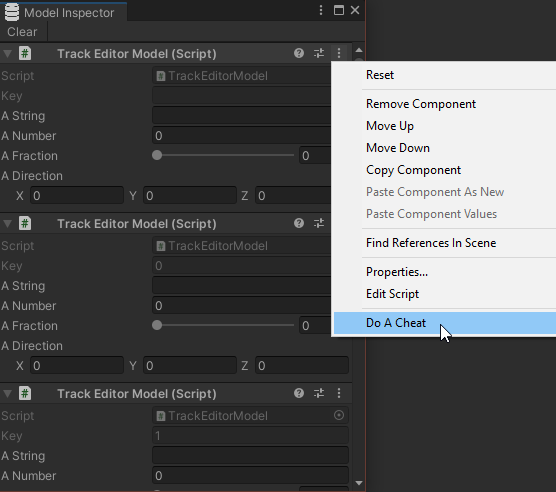
Models in the Model-View-Controller code pattern are scripts responsible for storing and organizing data. Data contained in a model script is later manipulated by the controller scripts, while the view scripts uses it as reference to update its display. In this MVC package, models typically variables, delegates, and occasionally helper methods/properties with the [ContextMenu("")] attribute, which can be used in the Model Inspector window.
A number of helper scripts has been created to help enforce this pattern. First, the Model script is an abstract class one can extend to create a custom model. The ModelFactory.Create<IModel>() can be used to create a new model, while ModelFactory.Get<IModel>() retrieves an existing one. Finally, a helper window, Model Inspector, can be opened to observe while the game is playing what models have been created, what data they contain, and even edit them.
Model Abstract Class
Model is a base class intended to be extended so that ModelFactory can create this instance. As mentioned prior, the programmer is expected to create a concrete class with serialized/public variables, delegates, and occasionally helper methods/properties with the [ContextMenu("")] attribute. Note that Model already has a read-only property called Key, which returns an optional string the model's instance is associated with in the ModelFactory's dictionary. Below is an example of how one would write a custom model:
using OmiyaGames.MVC;
using UnityEngine;

public class CustomModel : Model
{
    // Serialized member variable
    public string text = "Testing!";

    // Delegate for the controller to define
    public Controller.EventBase<string> ChangeText;

    // Context Menu method, usually for implementing cheats
    [ContextMenu("Log Text")]
    public void LogText()
    {
        Debug.Log(text);
    }
}
Despite being a MonoBehaviour, common Unity functions like Start() and Update() will not be called in a Model, as the GameObject it's attached to, ModelFactory, is not activated. To mitigate this, there is a virtual method, OnCreate(ModelFactory), one can override to initialize any member variables as soon as ModelFactory.Create<Model>() is called.
public class CustomModel : Model
{
    public string text;

    protected override void OnCreate(ModelFactory source)
    {
        text = "Testing!";
    }
}
IModel Interface
For added flexibility, ModelFactory.Get<Model>() can also create any components implementing the IModel interface. When defining a custom model this way, note that the first argument of method void OnCreate(string, ModelFactory), which the interface requires the script to define, should be stored and returned by the other mandatory getter property, string Key. As a demonstration:
public class CustomModel : Rigidbody, IModel
{
    // Store the key from OnCreate!
    string key;

    /// <inheritdoc/>
    public void OnCreate(string key, ModelFactory source)
    {
        this.key = key;
    }

    /// <inheritdoc/>
    public string Key => key;
}
ModelFactory
ModelFactory is a singleton script that automatically generates a deactivated GameObject hidden from the Hierarchy window. It's recommended that a controller script is used to attach a model to this singleton GameObject via ModelFactory.Create<CustomModel>(). A typical controller might look as follows:
using OmiyaGames.MVC;
using UnityEngine;

public class CustomController : MonoBehaviour
{
    CustomModel model;

    [SerializeField]
    string firstText = "First!";

    // Using Awake() so model is created before Start()
    void Awake()
    {
        // Create the CustomModel
        model = ModelFactory.Create<CustomModel>();

        // Setup initial data of the model
        model.text = firstText;
        model.ChangeText = (source, newText) => model.text = newText;
    }

    void OnDestroy()
    {
        // (Optional) Destroy the CustomModel
        ModelFactory.Release<CustomModel>();
        model = null;
    }
}
This can later be retrieved by a view script using ModelFactory.Get<CustomModel>() or ModelFactory.TryGet<CustomModel>(out CustomModel):
using OmiyaGames.MVC;
using UnityEngine;
using UnityEngine.UI;

public class CustomView : MonoBehaviour
{
    CustomModel model;

    [SerializeField]
    TextInput input;

    void Start()
    {
        // Retrieve the CustomModel
        // Note: if ModelFactory.Create<CustomModel>() hasn't been called yet,
        // this line *will* throw an exception!
        model = ModelFactory.Get<CustomModel>();

        // Update text input value
        input.text = model.text;
    }

    // Called by the submit button
    public void OnSubmitClicked()
    {
        // Let the controller define the behavior of this submit button
        if(model != null)
        {
            model.ChangeText?.Invoke(this, input.text);
        }
    }
}
Creating Mulitple Instances of the Same Model
Note that by default ModelFactory.Create<CustomModel>() does not let you create more than one instance of CustomModel. To create multiple instances of the same model, a unique key argument must be provided to ModelFactory.Create<CustomModel>(string):
public class CustomController : MonoBehaviour
{
    CustomModel[] models;

    [SerializeField]
    int numModels = 10;

    // Using Awake() so model is created before Start()
    void Awake()
    {
        // Create CustomModels
        models = new CustomModel[numModels];
        for(int i = 0; i < numModels; ++i)
        {
            models[i] = ModelFactory.Create<CustomModel>(i.ToString());
            models[i].ChangeText = (source, newText) => models[i].text = newText;
        }
    }

    void OnDestroy()
    {
        // (Optional) Destroy all CustomModels
        for(int i = 0; i < numModels; ++i)
        {
            ModelFactory.Release<CustomModel>(i.ToString());
        }
        models = null;
    }
}
To retrieve a specific instance, of course, the same key needs to be provided for ModelFactory.Get<CustomModel>(string):
public class CustomView : MonoBehaviour
{
    CustomModel model;

    [SerializeField]
    int modelIndex = 0;
    [SerializeField]
    TextInput input;

    void Start()
    {
        // Retrieve the CustomModel
        model = ModelFactory.Get<CustomModel>(modelIndex.ToString());

        // Update text input value
        input.text = model.text;
    }

    // Called by the submit button
    public void OnSubmitClicked()
    {
        // Let the controller define the behavior of this submit button
        if(model != null)
        {
            model.ChangeText?.Invoke(this, input.text);
        }
    }
}
Model Inspector
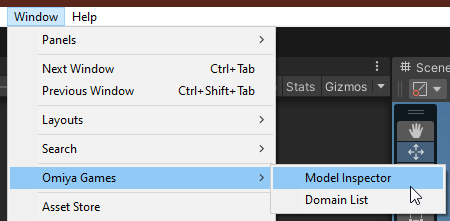
With this package a new window can be used to observe the runtime model data. One can simply access this by clicking on "Window -> Omiya Games -> Model Inspector."
The Model Inspector displays a list of models, exactly like how Unity's own Inspector window reveals the Components attached to a GameObject. And just like the built-in Inspector, Model Inspector also let's the user edit any data in the model in realtime! As an added bonus, one can even run methods with the [ContextMenu(string)] attribute. Great for debugging and triggering cheats!